
Could a modern phishing kit bypass your team’s multi-factor authentication? If you rely on six-digit codes, your accounts remain vulnerable to real-time interception. Understanding the gap between hardware keys and one-time passwords is the first step toward a true zero-trust architecture.
The Core Distinction: Cryptography vs Codes
The fundamental difference between these two methods lies in how they verify your identity. Hardware security keys, specifically those utilizing the FIDO2 and WebAuthn standards, rely on public-key cryptography. When you authenticate, the device signs a challenge using a private key that never leaves the hardware-protected vault on the physical device. The server only holds the public key, ensuring there is no "shared secret" that a hacker could steal.
In contrast, a one-time password (OTP) relies on a shared secret, often referred to as a "seed". Both the server and your authenticator app use this seed and a dynamic factor – typically time or a counter – to generate a code. While TOTP is the modern standard for most SaaS platforms because it replaces manual counters with Unix time, it remains a shared secret protocol. This means both you and the service provider hold the same sensitive information required to generate the code, creating a wider attack surface.
Why OTP is Not "Phishing-Resistant"
According to NIST and CISA, standard OTP methods do not qualify as phishing-resistant because they lack cryptographic origin binding. If a technician is lured to a convincing phishing page, they might unknowingly type their 6-digit TOTP code into a malicious field.
A threat actor using an Adversary-in-the-Middle (AiTM) proxy can capture that code and replay it to the legitimate service in real-time. Because the technical logic of TOTP only verifies that the code matches the current time window, the server cannot detect that the code was entered on a rogue domain.
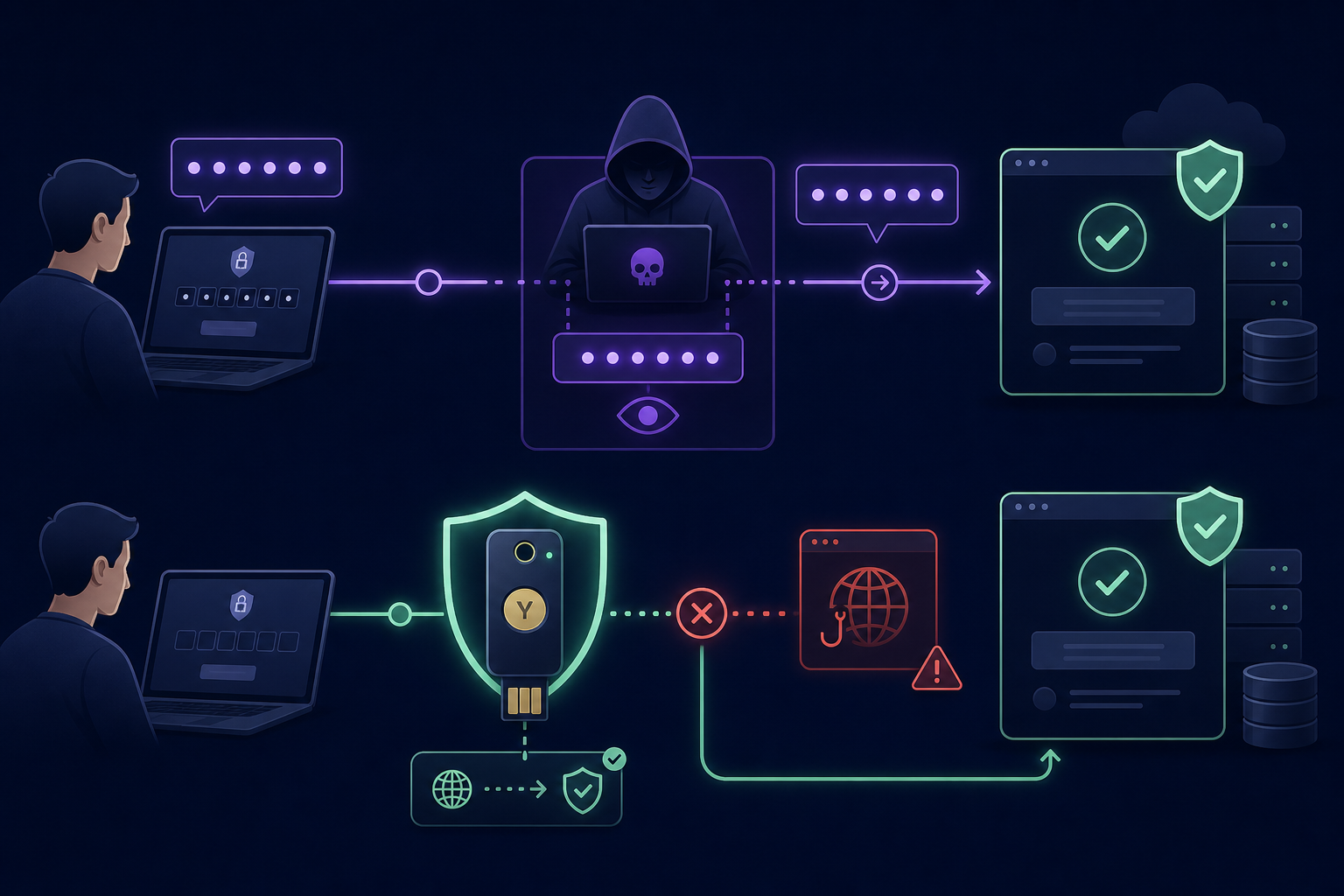
Hardware security keys solve this by binding the authentication assertion to the specific domain where the key was registered. A phishing site at g00gle.com cannot trick a hardware key registered to google.com into signing an authentication request. The browser knows the origin is different, and the hardware device refuses to provide a valid signature, rendering the phishing attempt useless.
Operational Trade-offs for IT Teams
While hardware keys offer superior security, they introduce logistical hurdles that centralised MFA management teams must address. For most organisations, a complete transition to hardware is hampered by several factors:
- Physical Provisioning: Hardware keys must be purchased, inventoried, and shipped. For remote-first organisations, this creates a constant overhead involving lost keys and replacement shipping logistics.
- Legacy Support: Not all internal tools support FIDO2/WebAuthn. Many organisations must reduce authentication risk by maintaining a hybrid environment where OTP is still required for legacy or non-compliant systems.
- Account Recovery: If a user loses their only hardware key, the lockout can be permanent. Establishing secure recovery paths often involves complex identity proofing or registering multiple keys per user to avoid downtime.
OTP, particularly software-based TOTP, excels in its ubiquity and ease of deployment. It requires no extra hardware and can be rolled out to thousands of users instantly via existing mobile devices or a shared OTP vault.
Developing a Tiered MFA Strategy
Most IT teams and MSPs find that a "one size fits all" approach is impractical. Instead, you should deploy a layered strategy that prioritises hardware-backed security for your most sensitive entry points:
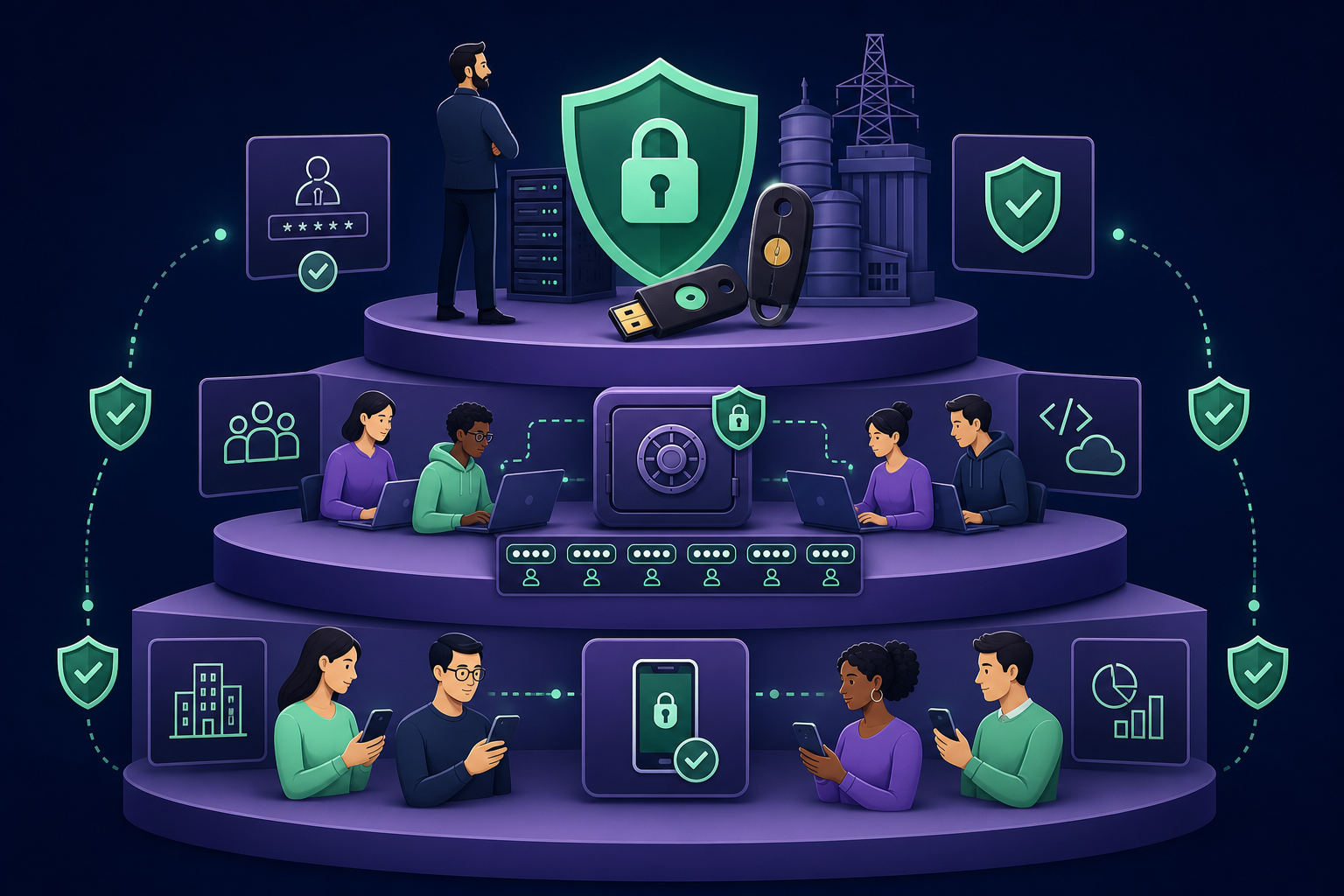
- Hardware Keys: Mandatory for root accounts, cloud console administrators, financial controllers, and critical production infrastructure.
- Shared TOTP: Used for team-based access to SaaS platforms and developer tools where multiple staff members require shared OTP access.
- App-based MFA: The baseline for general employees accessing standard business applications with lower risk profiles.
The primary risk for teams using OTP is not the protocol itself, but the lack of governance. When TOTP seeds live on an individual’s personal phone, you lose the ability to audit access or revoke permissions instantly when an employee leaves.
Moving Beyond Personal Devices
While hardware keys are the gold standard for high-privilege accounts, your team’s daily workflow will likely still involve OTP for many services. The goal is to move those secrets off personal devices and into a controlled, organisational environment.
By implementing MFA for teams, you can maintain the flexibility of software codes while gaining the audit logs and granular access controls usually reserved for hardware deployments. This approach allows MSPs to manage client MFA securely, ensuring that no single employee "owns" a critical authentication seed on a personal smartphone.
Centralise your team’s MFA secrets to eliminate the risk of ad hoc code sharing and personal device reliance. Start your 14-day free trial of Gatera today to secure your shared accounts with enterprise-grade encryption.